TFeed

Trade on ANY Platform — Directly on Odin — or Natively on Quantower

Unlike traditional prop firms that lock you to their platform, TFeed gives you three ways to trade: copy from any platform (Tradovate, Rithmic, NinjaTrader, TradingView, etc.) via Thor, trade directly on Odin (our included browser-based platform), or trade natively inside Quantower using our official TFeed vendor addon — no copier, no delay.

Complete platform freedom. Better rules. Real-time tracking.

Tradovate Rithmic dxFeed NinjaTrader TradingView Volumetrica

LEADER Account

Trade on ANY platform
(Prop Firm / Broker / Demo)

Thor

Thor

Connection Bridge

Connects your platform to TFeed
(Included free)

TFeed Accounts

FOLLOWER Accounts

Your TFeed prop firm accounts

OR
Odin

Odin

Included Trading Platform

Trade directly from your browser
(Charts, DOM, 9 Modules)

TFeed Accounts

FOLLOWER Accounts

Your TFeed prop firm accounts

OR
Quantower

Quantower

Native Trading via Addon

Install the TFeed addon and trade natively
(No copy, no delay)

TFeed Accounts

FOLLOWER Accounts

Your TFeed prop firm accounts

Get TFeed Access Learn How It Works

Official TFeed Partner

Phoenix Trader Funding

What is TFeed?

TFeed is a simulated proprietary trading firm platform built by Phoenix Technologies. It provides universal connectivity, allowing traders to copy trades from any supported platform (Rithmic, Tradovate, NinjaTrader, TradingView, cTrader, MetaTrader 4, MetaTrader 5, and more) to TFeed simulated accounts. TFeed works with leader accounts from any platform, making it ideal for sim trading and evaluation practice.

Last updated: April 2026

What is TFeed Really?

Understanding TFeed in simple terms

The Simple Explanation

TFeed is an order execution platform like Rithmic Rithmic or DxFeed DxFeed but without the market data.

How does it work: You trade with your favorite prop firm, broker or demo account on your favorite platform (Tradovate, NinjaTrader) and we replicate the orders with Thor, the trade copier, to your TFeed account.

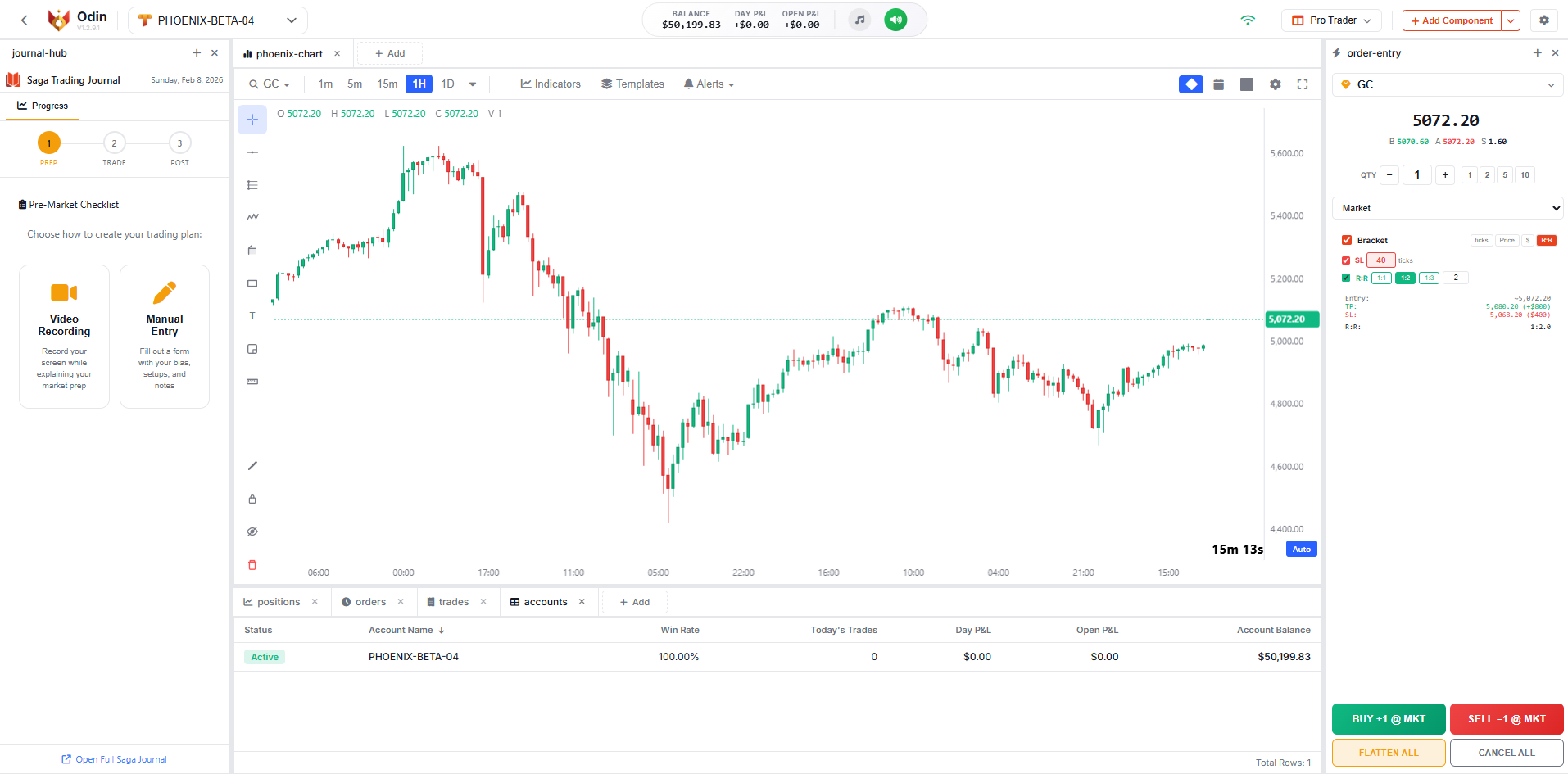
Or trade directly on Odin, our professional trading platform built into the Thor dashboard — with custom charts, a DOM ladder, and 9 trading modules. No external platform needed.

Or trade natively on Quantower using our official TFeed vendor addon. Install the addon, connect with your TFeed credentials, and place orders straight from Quantower — no copier in the loop, no execution delay. Full Quantower feature set against your TFeed prop firm balance.

Why TFeed NEEDS a Leader Account

Tradovate Rithmic NinjaTrader TradingView dxFeed Volumetrica

Your Leader Account

Any platform, prop firm, broker, or demo

Thor

Thor

Connects your platform to TFeed

TFeed

TFeed Follower

Your simulated prop firm account

What This Means For You

  • Use Your Favorite Platform: Trade on the platform you already know - no learning curve
  • Start for FREE: Use free demo accounts - no additional platform costs
  • Keep Your Workflow: Don't change how you trade, just add TFeed tracking
  • Real-Time Sync: Your trades appear instantly on your TFeed account
  • Or Trade on Odin: Use our included trading platform with charts, DOM, and a built-in journal — no external platform required
  • Or Trade Natively on Quantower: Install our TFeed vendor addon and trade your TFeed accounts directly from Quantower — no copy, no delay, full native execution

How TFeed Works

Get started with TFeed in 4 simple steps

1

Get TFeed Account

Sign up through a partner prop firm like Phoenix Trader Funding and receive TFeed access included with your account

2

Pick How You Want to Trade

Three ways to trade your TFeed account: (1) copy from any platform — Tradovate, Rithmic, NinjaTrader, TradingView, dxFeed — via Thor, (2) trade directly on Odin in your browser, or (3) trade natively inside Quantower using our official TFeed addon. Your choice!

3

Copy Trades

Trades from your leader account automatically copy to your TFeed simulated accounts with real-time execution

4

Track Performance

Monitor your TFeed accounts with advanced statistics, real-time analytics, and detailed performance reports

What Do You Get When You Buy a TFeed Account?

Three powerful components working together

COMPONENT 1
TFeed

TFeed

The TFeed Account

Handles every single parameter and rule set by your prop firm account with detailed real-time tracking.

  • Profit goals & targets
  • Daily drawdown limits
  • Max drawdown rules
  • Commissions & fees
  • Scaling plans
COMPONENT 2
Thor

Thor

Limited Thor Access

Included trade copying software that bridges your world.

Connect FROM these platforms:

Tradovate
Rithmic
NinjaTrader
TradingView
dxFeed
Volumetrica

+ Any prop firm, broker, or demo account

Important: Can ONLY copy TO TFeed accounts (not to other destinations)

COMPONENT 3
Odin

Odin

Included Trading Platform

A full professional trading platform built into your Thor dashboard. Trade your TFeed accounts directly — no external platform needed.

  • Custom charts (30+ drawing tools)
  • Click-to-trade DOM ladder
  • 9 modular trading components
  • Built-in journal (Saga)
  • Browser-based, no install
Learn more about Odin

Trade on Your Favorite Platform

Most prop firms force you to learn THEIR platform. TFeed lets you keep using what you already know.

Tradovate

Tradovate

Rithmic

Rithmic

dxFeed

dxFeed

NinjaTrader

NinjaTrader

TradingView

TradingView

Volumetrica

Volumetrica

Other Prop Firms

Or Trade Directly on Odin

A professional trading platform included with every TFeed account

Odin Trading Platform
Included FREE with every TFeed account

Your Complete Trading Station

Don't have an external platform? No problem. Odin is a full trading platform built right into the Thor dashboard. Charts, DOM, order entry, journal — everything you need to trade your TFeed accounts directly from your browser.

  • Professional Charting — 20+ indicators, 30+ drawing tools including harmonics, Elliott waves, and Fibonacci
  • Click-to-Trade DOM — 25-level depth of market with one-click order placement
  • 9 Modular Components — Order entry, positions, trades, watchlist, accounts, and more
  • Built-in Journal (Saga) — Pre-market planning, trade notes, session grading, and emotion tracking
  • Copy Trading — Thor's copy engine built right in, manage multiple accounts from one place
  • Browser-Based — No downloads, no installation. Works on any device with a browser
Learn More About Odin

Or Trade Natively on Quantower

Install our official TFeed vendor addon and trade your TFeed accounts directly from Quantower — no copier, no delay, full native execution

Quantower Quantower Vendor Addon
Native execution — no copy step

Your TFeed Account, Inside Quantower

Already use Quantower? Install Thor's official TFeed vendor addon and trade your TFeed prop firm accounts directly — just like trading any native broker. No external leader account, no copier in the loop. Use Quantower's full feature set (charting, DOM, strategies, indicators) against your TFeed balance.

  • Native Trading — Orders go straight to your TFeed account, no copier in the loop
  • Simple Setup — Download the addon, install, and sign in with your TFeed credentials
  • Full Quantower Stack — Charts, DOM, strategies, indicators — everything Quantower offers, against your TFeed balance
  • Zero Copy Delay — No copy step means execution as fast as the platform allows
Download Quantower Addon Watch Setup Tutorial

Can TFeed Run with Demo Accounts?

Maximum flexibility for your trading setup

Yes! TFeed Works with Demo Accounts

You don't need a funded prop firm account or expensive broker account to use TFeed. Demo and simulated accounts work perfectly as leader accounts.

Example Setup with Demo Account

Tradovate
Tradovate Demo

FREE Leader Account

Thor
Thor

Data Connection

TFeed
TFeed Accounts

Your prop firm accounts

TFeed Pricing

Simple, transparent pricing through Phoenix Trader Funding

Phoenix Trader Funding
×
TFeed
Exclusive Partnership Deal

One Account, All Benefits

Purchase through Phoenix Trader Funding and get complete access: TFeed platform + Thor Data Connection + all exclusive partnership benefits.

DCA Allowed

Dollar Cost Averaging strategies are fully permitted. (Restricted on standard Phoenix accounts)

50% Lower Commissions

Keep more of your profits with commission rates half the cost of standard Phoenix accounts.

30-Day Inactivity Rule

Take a break when you need it. 30 days allowance vs 7 days on standard Phoenix accounts.

Real-Time Payout Tracking

Live dashboard showing exactly when you're eligible for your next payout.

Trade on ANY Platform

Don't change your workflow. Use Tradovate, Rithmic, NinjaTrader, TradingView, or any platform you prefer while we sync everything.

What Happens After You Pass?

Your journey from evaluation to funded trader

Pass Evaluation

Meet profit targets and follow the rules while trading on your preferred platform

1

Get Sim-Funded

Transition to a simulated funded account with real payout eligibility

2

TFeed Tracks Your Progress

TFeed monitors your payout eligibility in real-time and keeps track of all Phoenix payout rules

3

Request Payouts on Prop Firm Site

When eligible, request withdrawals directly on your prop firm's website (e.g., Phoenix Trader Funding partner portal)

4
Phoenix Trader Funding
Official TFeed Partner

Get TFeed with Phoenix Trader Funding

Phoenix Trader Funding includes TFeed access with every account. Trade from ANY platform you prefer with TFeed's universal connectivity.

Get Started with Phoenix

Frequently Asked Questions

Everything you need to know about TFeed

What is TFeed?

TFeed is a prop firm platform that lets you trade from ANY platform you want. It separates the data feed from the account execution. You trade on your favorite platform (Tradovate, Rithmic, NinjaTrader, TradingView), and Thor Data Connection automatically syncs your trades to your TFeed prop firm account.

What is Odin and how does it work with TFeed?

Odin is a professional browser-based trading platform included free with every TFeed account. It gives you charts, a DOM ladder, order entry, and 9 trading modules — all built into your Thor dashboard. You can trade your TFeed accounts directly on Odin without needing any external platform. It's a second way to trade alongside the traditional approach of copying trades from an external platform. Learn more about Odin.

Can I use a free demo account with TFeed?

Yes! You can use free demo accounts from Tradovate, Rithmic, NinjaTrader, or any other platform as your trading platform. This means no additional platform costs - just your TFeed account and a free demo account to trade from.

How do I get TFeed access?

Visit PhoenixTraderFunding.com, choose your account size, and select "TFeed" at checkout. You'll get instant access to your TFeed account + Thor Data Connection.

Does TFeed support ProjectX?

TFeed doesn't support ProjectX as a leader, and since they have announced that they won't be supporting any prop firms starting on February 2026, we won't integrate it. That said, ProjectX is available for follower accounts with the full version of Thor.

Can I upgrade to the full version of Thor if I'm a TFeed client?

Yes, with 50% OFF lifetime!