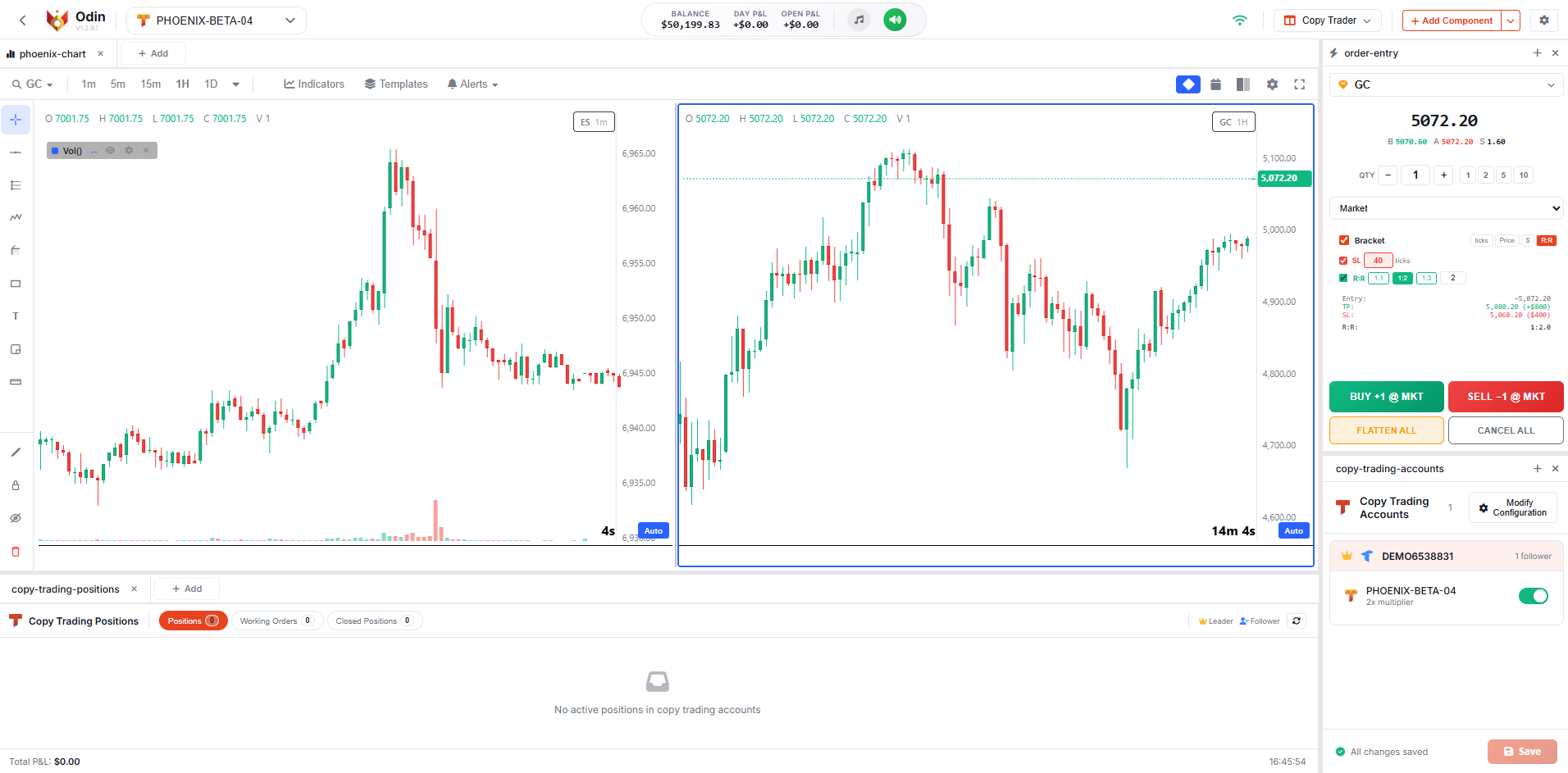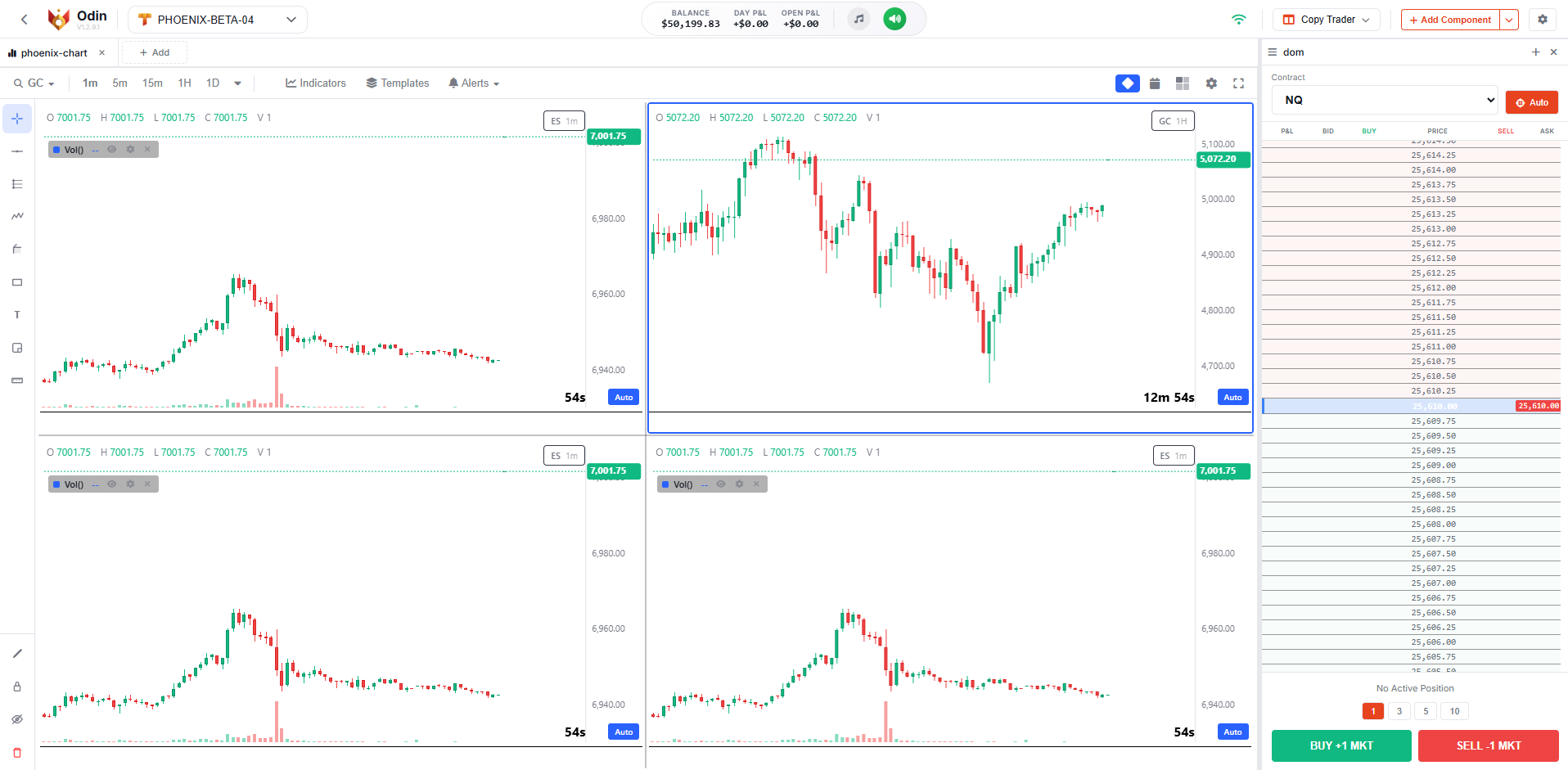
Professional Trading Platform

Command Every Market
From One Platform

Custom charts, DOM ladder, order entry, copy trading, and a full journal. Everything in one place, right in your browser.

9
Trading Modules
30+
Drawing Tools
20+
Indicators
Saved Layouts
Modular Workspace

Your Trading.
Your Layout.

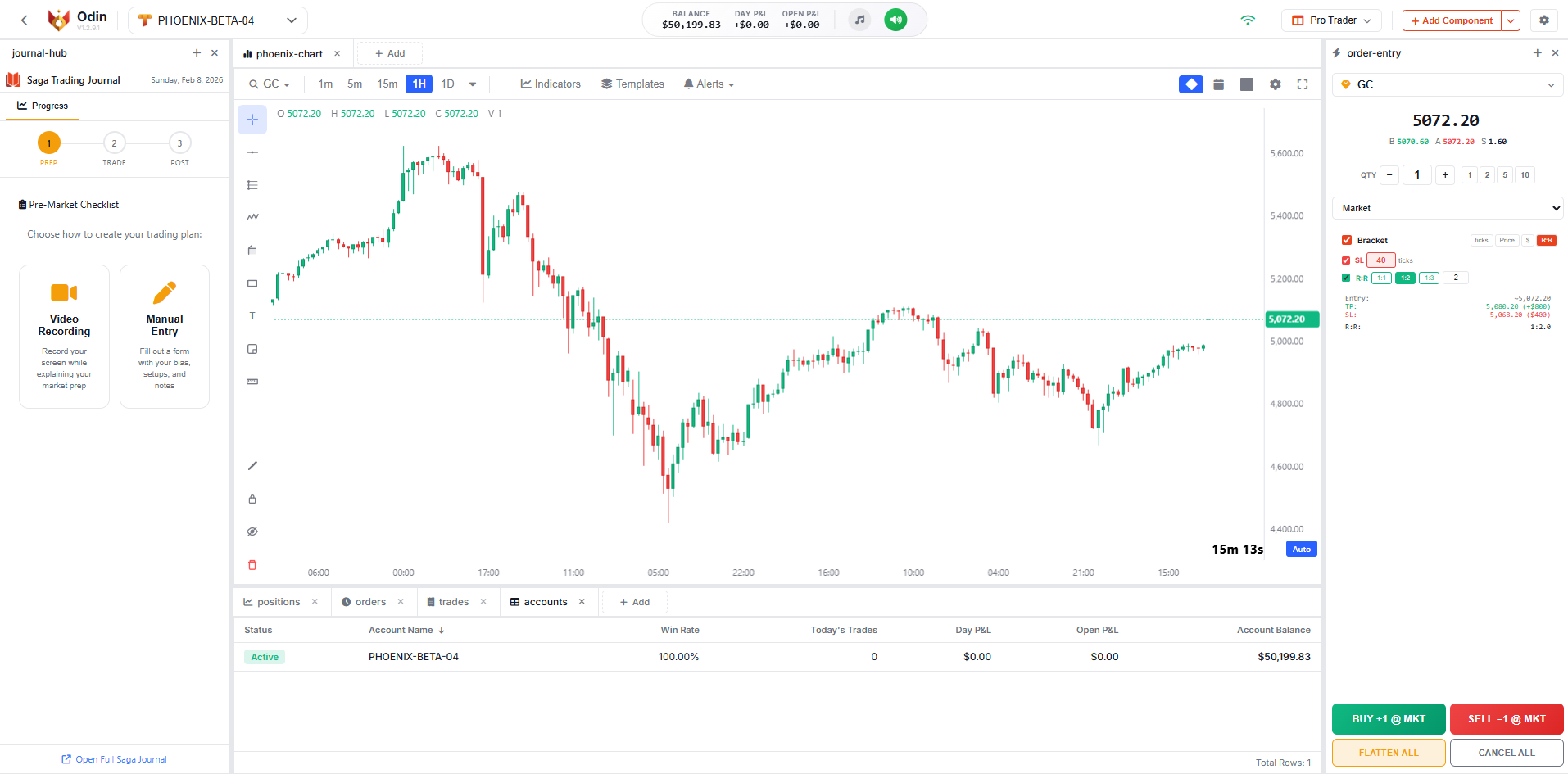
Move any module anywhere. Resize, stack, split. Save your layouts and switch between them.
Drag & Drop
Split Panels
Save Layouts
Import/Export
Resizable
Multi-Monitor
Trading Modules

9 Modules,
One Platform

Each module handles one job. Put them together and you have a full trading station.

01 / Order Entry

Place orders your way

Market, limit, stop, and stop limit. OCO brackets built in. Keyboard shortcuts for everything.

  • Market / Limit / Stop / StopLimit
  • OCO Bracket Orders
  • Quick Symbol Picker
  • Keyboard Shortcuts
  • Live P&L Preview
BUY
SELL
02 / Positions

Track what you're holding

See all your open positions with live P&L. Color coded by direction, works across all accounts.

  • Live P&L updates
  • Long / Short color coding
  • Works across accounts
  • Full position details
03 / Orders

Working Orders

All your pending orders in one panel. Cancel individually or all at once.

04 / Accounts

All Accounts

Balances, equity, P&L, and connection status. All in one place.

05 / Trades

Full trade log

Every trade logged with entry, exit, duration, and P&L. Across all your accounts.

  • Entry and exit prices
  • Duration per trade
  • P&L breakdown
  • All accounts combined
06 / Watchlist

Live Quotes

Bid/ask, volume, and price movement for all your symbols.

Saga Integration
07 / Journal
Saga

Built-in journal

Three phase journal: prep before the session, log during, review after. Powered by Saga.

  • Pre-market bias and planning
  • Daily P&L goals and loss limits
  • Live trade notes
  • Session grading (A+ to F)
  • Emotion tracking
  • Lessons learned
Prep
Trade
Review
08 / DOM

Price Ladder

25 levels. Click a price to trade. Your orders show right on the ladder.

09 / Charts

Odin's Charts

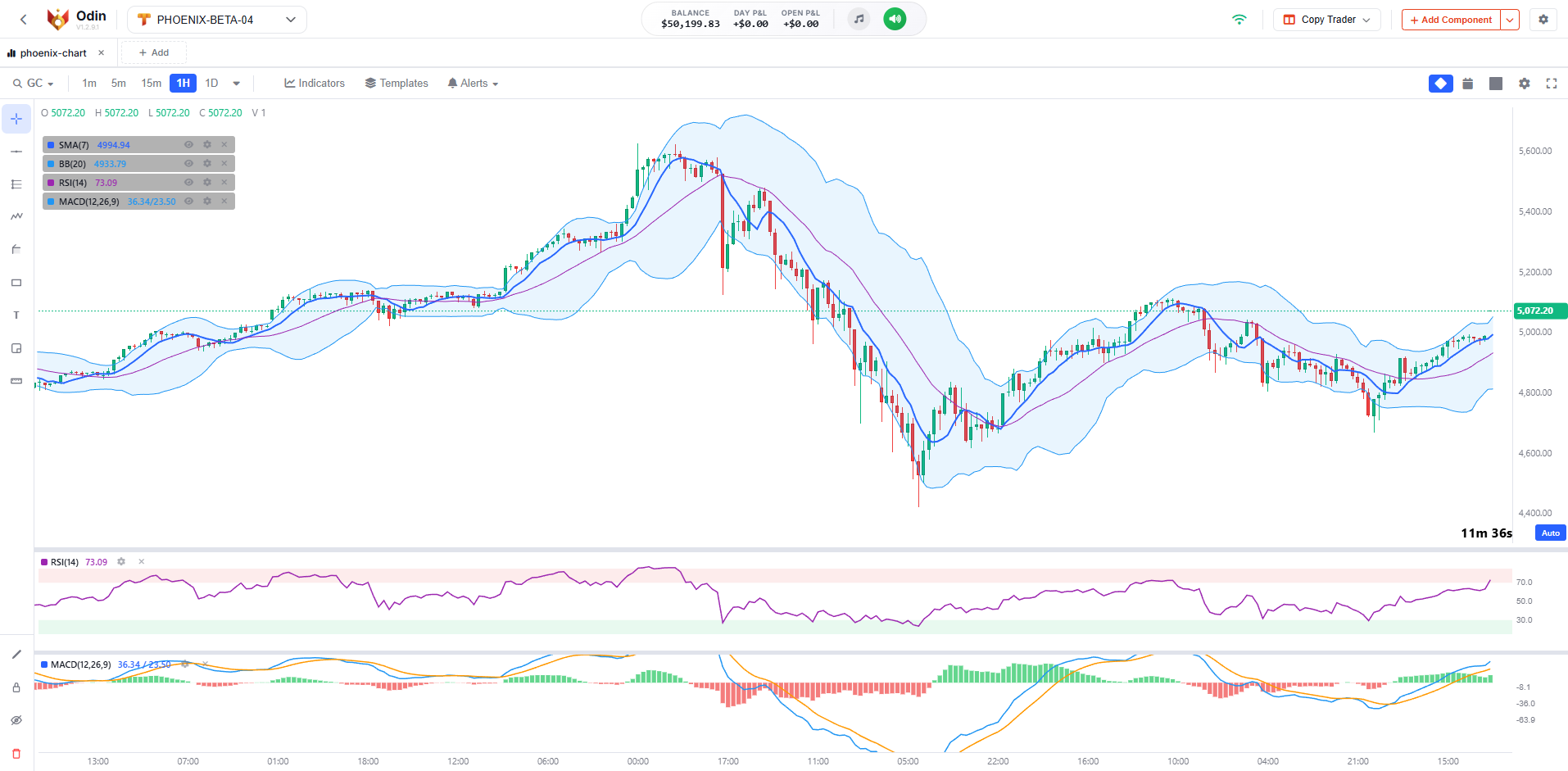
Our own engine. 20+ indicators, 30+ drawing tools, alerts, multi chart layouts.
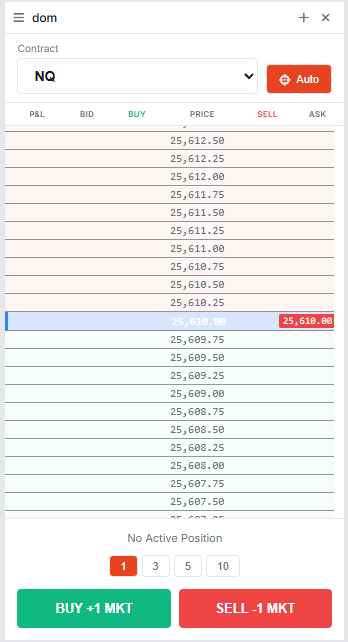
Depth of Market

Trade From The Ladder

Odin Depth of Market price ladder

Click to Trade

Click any price level to place an order instantly.

25 Levels Deep

25 levels above and below the current price, with volume on each side.

Orders on the Ladder

Pending orders show up right on the price levels where they sit.

Position Marker

Your entry price is marked on the ladder with a live P&L next to it.

Auto Tick Size

Tick size and price precision adjust automatically for each symbol.

Quick Quantity

Switch between preset sizes with one click before placing your order.

Odin's Charts

Custom-Built
Charting Engine

We built this from scratch. 30+ drawing tools including harmonics, Elliott waves, Gann, and 8 Fibonacci types. You can even attach alerts directly to your drawings.

Odin Chart with Indicators
SMA EMA RSI MACD Bollinger VWAP ATR Stochastic Volume Profile 20+ more
Drawing Tools
30+
Harmonic Patterns
XABCD
Elliott Waves
4 Types
Drawing Alerts
Built-in
Harmonic & Waves
XABCDCypherThree DrivesHead & Shoulders Elliott ImpulseElliott CorrectionElliott Combo
Fibonacci
RetracementExtensionChannelCircles SpiralWedgeTime ZoneSpeed Fan
Gann & Cycles
Gann BoxGann FanGann Square Time CyclesSine WavesCycle Brackets
Channels & Pitchforks
Parallel ChannelRegression TrendDisjoint Channel PitchforkSchiff PitchforkInside Pitchfork
Projection & Forecasting
Long PositionShort PositionForecast Bars PatternGhost FeedTrend Angle
Price Alerts
Yes
Indicator Alerts
Yes
Notifications
Audio/Visual
Email
Integrated

Get Notified

Set alerts on price levels or indicator conditions. Audio, visual popup, or email. Works even when you're looking at a different chart.

Layouts
8 Presets
Panels
Resizable
Crosshair
Synced
Timeframes
Independent
Odin Multi-Chart Grid Layout
Copy Trading

Mirror Trades Across Accounts

Thor's copy trading engine is built right into Odin. One provider, multiple followers, every order copied.

Thor

Powered by Thor

Pick a provider account, add your followers, and trade. Entries, exits, brackets, everything gets copied to the other accounts in real time. No extra tools or setup required.

Built for Performance

Under The Hood

The stuff that makes Odin actually usable day to day.

Modular Docking
Drag any module anywhere. Dock it, resize it, stack it. Make the layout work for you.
Layout Persistence
Save as many layouts as you want. Import, export, and share them. Auto saves every change.
Ultra Low Latency
Prices, fills, and position updates hit your screen the moment they happen. No delay, no waiting.
Dark Theme
Easy on the eyes for long sessions. Toggle between dark and light.
Multi-Language
The entire interface is available in multiple languages.
Keyboard Shortcuts
Buy, sell, flatten, switch modules. All from the keyboard if you prefer.
Get Started

How to Get Odin?

Odin comes with every TFeed account from Phoenix Trader Funding.

Phoenix Trader Funding
Official Partner

Get a TFeed data feed account through Phoenix Trader Funding and you get Odin with it. All modules, all features, everything included.

Get Started with Phoenix
Instant Access · No Hidden Fees · Full Platform
Testimonials

What Traders Say

From traders who use Odin daily.

"

I put my DOM on the left, chart in the center, journal on the right. Saved the layout and it's there every morning. Exactly what I needed.

M

Marcus W.

Futures Day Trader

"

I was skeptical about browser based charts but Odin's charts surprised me. Harmonics, Elliott waves, Gann tools, all there. I don't miss my desktop platform at all.

S

Sarah K.

Swing Trader

"

I have 4 funded accounts. Set up copy trading once and now every trade goes to all of them. The journal helps me stay disciplined too.

J

James R.

Prop Firm Trader

FAQ

Common Questions

What is Odin?
Odin is a trading platform that runs in your browser. 9 modules: Order Entry, Positions, Orders, Accounts, Trades, Watchlist, Journal Hub, DOM, and Charts. You arrange them however you want. The symbols you can trade depend on your data feed. Built by Phoenix Technologies.
How do I get access to Odin?
You get Odin when you subscribe to TFeed through Phoenix Trader Funding. All modules and features are included with your TFeed account.
How does copy trading work?
You pick a provider account and add follower accounts. When you trade on the provider, those trades get copied to all the followers automatically. You can configure risk multipliers and position sizing per follower.
Can I customize my workspace layout?
Yes. Drag, drop, and resize any module wherever you want. Save as many layouts as you need and switch between them. You can also export your layouts as JSON and share them.
Do I need to install anything?
No. Odin runs entirely in your browser. Chrome, Edge, Firefox, any of them. Works on Windows, macOS, and Linux. Just open the link and log in.

Start Trading With Odin

9 modules, custom charts, DOM, copy trading. Included with your TFeed account.

Instant Access
Official Partner
Full Platform